

Best Prices And Deals
- 96%
Best value

Qkronos EVO Strategy NT8

Add to wishlistAdded to wishlistRemoved from wishlist 17

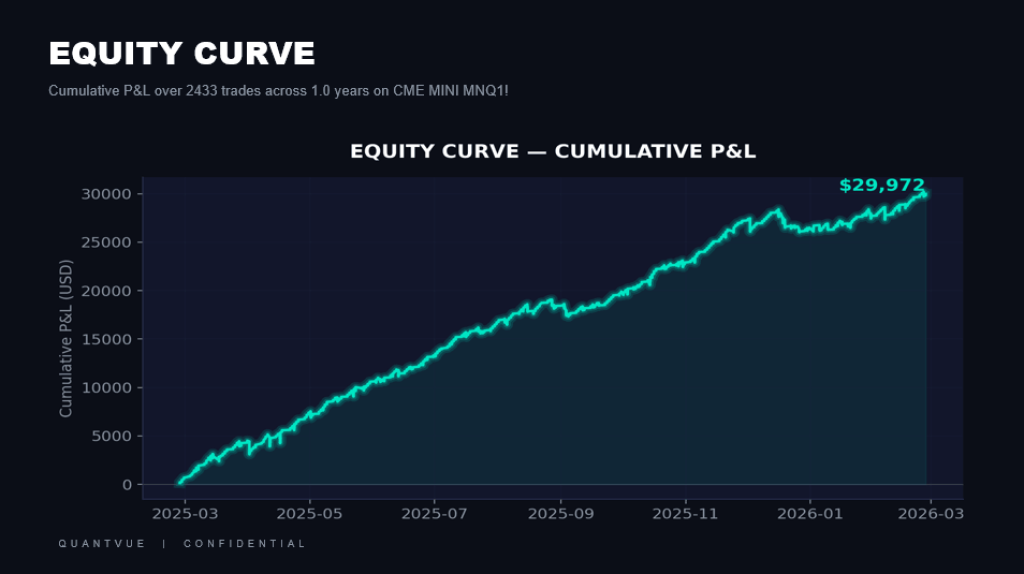
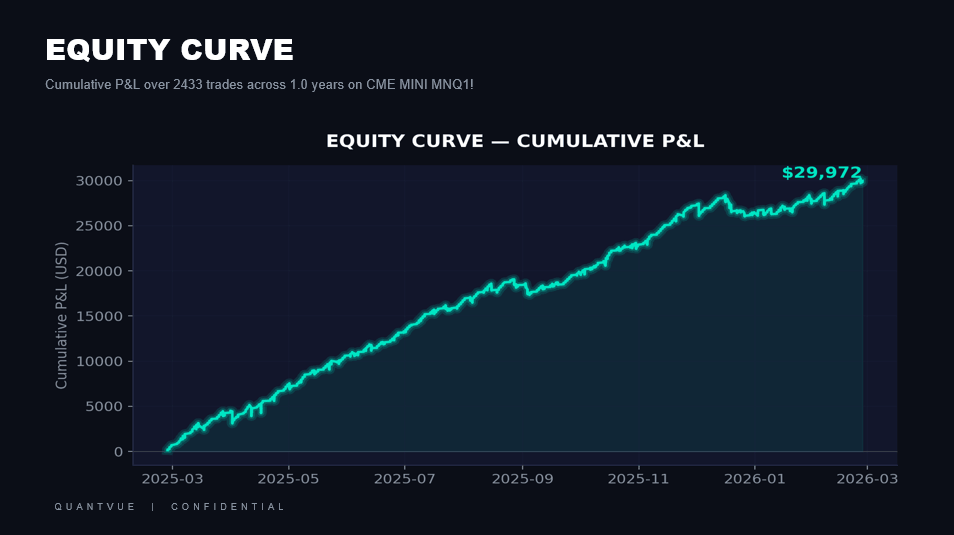
Qkronos EVO Strategy NT8 -Ultra-fast, high win-rate scalping strategySpecialized for lower timeframes like 30s, 1m, 3m, 5m

Original price was: 1.300,00 $.Current price is: 54,95 $.

7 Item Sold

Full Product Description:

Content: full NT8 system 

Original website: https://docs.quantvue.io/our-tools/automated-trading-strategies/qkronos_evo-strategy

Original Price: $ 1300


System information:

Ultra-fast, high win-rate scalping strategy
Specialized for lower timeframes like 30s, 1m, 3m, 5m
Extremely customizable settings
Built for any futures chart; NQ, ES, CL, GC, YM
All settings you will find here: https://docs.quantvue.io/our-tools/automated-trading-strategies/qkronos_evo-strategy
Features include:
  • The best adjustable algorithm available to the retail trader

  • Fully customizable to your style of trading

  • Volatility multipliers that adjust the algo’s stop loss and take profits dynamically during the trade

  • Build in compatibility with our QuantVue Automated Trading Suite software

Volatility Multiplier

Many of the settings in Qkronos_EVO are multipliers. This is a volatility calculation based on three separate factors, two are technical and one is based on data analytics and machine learning we’ve conducted. The formula is proprietary, but it will allow the strategy to adjust it’s take profit and stop loss dynamically during the trade. Real-time response to changing market conditions is a far more successful method of controlling trades than a static Risk:Reward ratio offered by many other algos on the market. Static numbers like that tend to overfit.

Because it adjusts during the trade, the initial marked Stop Loss and Take Profits on the chart may not be accurate by the end. Just know it’s doing what it should do.

Time Settings:

If Only Trade Within Specific Timeframe is checked, the strategy will only open trades during the Trading Time String.

There are three settings available under Force Trades to Close.

Force Trades to Close at End of Time String does precisely that – at the end of the Trading Time String all trades will close and it will not reopen until the string begins again.

Don’t Force Close will allow the trades to run to their natural completion after the time string ends, regardless of how long that is.

Force Close at Closure Time will cause the trades to run past the time string only until the Force Closure Hour and Force Closure Minute. Then it will close them.

Strategy Settings

Candle Type lets you select if you want to use HA smoothing or not. I typically recommend you run this on regular candles with HA smoothing turned on as it provides better trades in general.

Opening Methodology lets you choose Original, Expanded, Original Always-In, and Expanded Always-In.

Original and Expanded are both opening methodologies for your typical entry -> exit trade. Original provides less entries, expanded provides more. Generally original is the better choice here, however at some times expanded can perform better. You’ll want to test these if you’re developing a new set of settings.

Original Always-In, and Expanded Always-In will keep Qkronos trading as the markets move up and down, always staying in the market with at least 1 contract (based on the dynamic take profits discussed later).

Take Profit Methodology allows you to choose between three options of taking a profit to close the trade: Static Take Profit, Trailing Stop, and Trailing w/Tiered Exits.

Static Take Profit will allow you to select a multiplier in the take profit section which will close the entire trade once it has moved the requisite distance. Trailing Stop and Trailing w/Tiered Exits will both use a trail stop, as specified in the trailing stop settings section. The tiered exit version will take off part of the trade in the middle.

Use Qgrid As Confluence and Exit on Qgrid Switch will enable Qkronos_EVO’s Qgrid compatibility. It will use the Qgrid settings in the Qkronos_EVO settings panel to only trade in the direction of Qgrid. Exiting on the switch will cause the trade to exit if Qgrid switches directions, regardless of anything else.

Force Only One Direction will allow you to set a long or short bias, and force the algo to only trade in that direction.

Entry Settings:

Enter on Pullback allows the strategy to see where an entry should take place, and then set a limit entry to enter at a more favorable price as set.

The Pullback Type allows you to set either Ticks for measurement, or the same multiplier that is used everywhere else.

Stop Out Settings

Use Hard Stop will enable the algo’s ability to close the trade after a particular amount of loss. The multipler can be set below it.

Trailing Stop Settings

The Trailing Stop Engagement Multiplier is how far into profit the trade must move until the trailing stop activates. The Trail Offset Multiplier is how far the trade must reverse in order to close.

Static Take Profit Settings

Static Take Profit Multiplier controls how close the take profit is to entry.

Tiered Exit Settings

If Tiered Exits are selected under the Take Profit Methodology, then this will let you set the Absolute Quantity of contracts, as well as the Engagement Multiplier. The Engagement Multiplier is how far into profit the trade must move until the tiered exit activates. When the strategy detects a potential high during the trade, it will take a partial profit of the absolute quantity listed above.

Boost Settings

The Long Boost setting will double down contracts when it detects certain conditions likely to indicate a long trade as being a win. It’s risky and can lead to larger losses, however over time is likely to increase overall profit.

The Range Boost is one of the best settings to use and can be enabled almost universally. When it detects a certain condition it will use the Range Boost Take Profit Multiplier instead of the regular Static Take Profit Multiplier.

Make sure the Range Boost Take Profit Multiplier is set to a higher number than the Static Take Profit Multiplier. It increases profitability with almost no downside. Note that Range Boost only works with Static Take Profit under the Take Profit Methodology. The Range Boost Threshold will determine how often it takes them. Lower numbers make them happen more often, and higher numbers make it more selective.

Martingale Settings

Martingale is a betting strategy, explained simply as doubling down on each loss. In many cases this can be devastating if the strategy is not built properly.

When using Martingale, ensure the backtest maintains a 70%+ win rate so that it is perfectly profitable without martingale. When you have a high win rate of 70%+ and a strategy that almost never sees more than 2 losses in a row, martingale serves only to smooth the curve and increase overall profitability.

The Max Contracts Opened setting allows you to control the maximum number of contracts that will be opened using martingale, if Enable Max Contract Limit is turned on.

Qgrid Settings
Always In Settings

Always In can use an Adaptive Trailing Stop which will take a partial profit during the trade, somewhat like the Tiered Exits. Set the absolute quantity here.

The exact functions of the Coefficient Offsets is proprietary, but are included for advanced users who would like to try different settings. As of this time I have yet to see anything other than default work for the long term. Each tooltip contains the maximum +/- that you can set it to. The Multiplier Length Offset will allow you to change how quickly the strategy reacts to changes in volatility.

Profit/Loss/Trade Limits
Always In Settings

The Profit Limits and Loss Limits use TradingView’s built in counter of profit and loss to stop the trades. This is inaccurate at best. It is far better to use Tradovate’s built in Profit Target and Stop Loss limits. The Trade Count Limit however is accurate. It will limit the trading to only x number of trades per day.

Alerts Section
This is a section that changes frequently based on the version of ATS currently in use, however some things will remain the same or similar. For current information and setup walkthrough see the ATS videos. The source can either be ATS alerts as described in the ATS videos, or the Custom Alerts at the bottom. ATS User ID is your xx_1234567890 id from the ATS screen. ATS Spam Key is your spamkey from your ATS screen. ATS Comment can simply be used to send a human readable comment with the alerts. The Custom Alerts section allows you to send, or not send, whatever custom JSON you’d like on each action. They’re retrievable, just like the ATS commands, using {{strategy.order.alert_message}} in the alert message box.
Qkronos EVO Strategy NT8 1


Forex Outlet Shop - Customer Satisfaction GuaranteedForex Outlet Shop - Money Back Guarantee

  • 100% MONEY BACK GUARANTEED (for corrupted or defected files) OR
  • AS A SITE OF TRUST WE GIVE YOU A DOUBLE CHARACTER REPLACEMENT (we give you a 2 “high rated” items if you get (corrupted or defected files)

Forex Outlet Shop - Top rated Plus SellerForex Outlet Shop - Top rated Plus Seller 2Forex Outlet Shop - Top rated Plus Seller 3Forex Outlet Shop - ebay logo

We are “EBAY” school, with a lot of experience in sales. Our priority is customer satisfaction, are you our number one priority.We will always be happy to help you with any technical support in the form of installation of our items and give you advice about Brokers with whom we have contracts and you will always receive special benefits, as well as free advice and Forex Strategies from us.

As a trusted Forex Site, your satisfaction is our number one priority and we will strive to meet you in a way that will always “exceed” your expectations.

As a long-time “EBAY” Top Rated Seller Plus, we have decided to develop and expand our business through this site. You have all the benefits and three times more benefits with us …. see you here and “Stay Safe” in these difficult times!

Some items you will receive “instantly”,but some items you will receive for max.24h (usually few hours),because we have a several servers,and some of them need manual sending because we have an extremely large warehouse of items
After purchase,if you don’t receive your download link,you will get it for max.24h (usually few hours)-from 20min to 2 hours,also you will get one popular Item as a gift from us
In the case when you purchase item,and you “get” “instantly”,you will also get one popular Item as a gift from us max.24h (usually few hours)-from 20min to 2 hours
We send you your items to the email address you provided when paying, and please “MUST” check that our message with your Item did not come to “SPAM” instead of “inbox”, is this a common case
If you do not receive a message from us with your item, please notify us immediately by email and we will respond immediately and send you your items and gift by sending through “reply”from the received email

Features Product details
Compatible with NFA, FIFO and NT8 Platform: NT8
ECN Support Language: English
Perfected For Multiple Pairs Time Frames: System works with every NT8 TF
Works With Any NT8 Trading Brokerage Trading Time: Any time | Recommended London and New York sessions
Unlimited Licenses For All Your NT8 Accounts Currency pairs: Any pairs | Recommended major pairs + indexes
No Trading Experience Required Purchase includes: Indicators | Templates
US Brokers | Non-US Brokers Trading Accounts: Unlimited
No Trading Account Limitations License: Unlimited
Popup Alerts Indicators (Unlimited)
No Minimum Leverage Required
* instant delivery (email inbox/account dashboard)

Conclusion:

I want to repeat that the system is very effective. It will definitely help you achieve your financial goals whatever they are.

Fast delivery within 24 hours

I’m reseller of unlocking digital good’s

I’m not a trader

All indicator’s,FX strategies and EA’s are working and unlocked for use

Please note: I do not give refunds based on the performance of the product. There are many factors that can affect the performance and results of the product such as brokers, internet connection and the experience of the user. You are receiving a working product that has been tested and all sales are final.

no returns accepted for any reason

Forex Outlet Shop
Logo
Shopping cart