




NinjaFX EA MT4 + Setfiles Build 1441+(ORIGINAL)
NinjaFX EA MT4 + Setfiles-provides a straightforward route into automated trading on three popular markets. By combining speed, adaptable risk settings, and prop-firm-friendly limits, it caters to both hobby traders and those looking to pass a funded account challenge. Remember to back-test, forward-test, and never risk money you cannot afford to lose.
Original price was: 699,00 $.26,95 $Current price is: 26,95 $.
Full Product Description:
Content:
1 EXPERT EX4 UNLOCKED / / GUIDE/5 presets/indicators
MT4 VERSION
MT4 VERSION
This EA can work only on the MT4 Terminal Build 1441+ Version
Original website: You will easily find all the necessary information about this product on Google or you will receive it within the download link
Results: You will easily find all the necessary information about this product on Google or you will receive it within the download link
ORIGINAL VERSION,THIS IS AN ORIGINAL VERSION
ORIGINAL VERSION,THIS IS AN ORIGINAL VERSION
NO DLL NO DLL NO DLL NO DLL NO DLL NO DLL
NEW NEW NEW NEW NEW NEW NEW NEW NEW NEW NEW NEW NEW
NEW NEW NEW NEW NEW NEW NEW NEW NEW NEW NEW NEW NEW
NO DLL NO DLL NO DLL NO DLL NO DLL NO DLL
Basic means-(There is no guarantee that the Ex4 will last for a long time)
Basic means-(There is no guarantee that the Ex4 will last for a long time)
Original Price: $ 699
Expert information:
NinjaFX EA – Automated trading has become mainstream thanks to platforms such as MetaTrader 4 (MT4). One tool that has attracted plenty of attention is NinjaFX EA. Paired with NINJA FX MT4 – Advanced Forex & Indices Trading EA, this system is designed to trade US30, Gold (XAUUSD), and EURUSD around the clock. In this guide, you will see how the EA works, how to install it, how to tweak settings, and what to expect in real-world trading.
What Is NinjaFX EA?
NinjaFX EA is a fully automated trading robot (Expert Advisor) for MT4. It is coded to read market data, open trades, manage risk, and close orders without manual input. The developer focused on three liquid markets:
- US30 (Dow Jones Industrial Average CFD)
- XAUUSD (Gold)
- EURUSD (major currency pair)
Key attributes:
- Works on M5 for quick scalps
- Works on H1 for broader swings
- Starts with roughly $500
- Adjustable risk settings
- Fast order execution to reduce slippage
Why Trade With NINJA FX MT4?
Traders pick NINJA FX MT4 for one or more of the following reasons:
- Diversification – Trade indices, metal, and a currency pair without running three separate EAs.
- Low Barrier to Entry – A $500 account is usually enough for micro-lot testing.
- Prop Firm Friendly – Drawdown filters and news filters aim to respect typical funded-account rules.
- Time Efficiency – Once configured, the EA runs 24/5, letting you keep your day job.
- Flexible Strategy – Choose between scalping and swing trading by switching timeframes.
Supported Assets
| Asset | Symbol | Typical Spread* | Why It Matters |
|---|---|---|---|
| Dow Jones CFD | US30 | 2–5 points | Volatile; strong intraday moves for scalping |
| Gold | XAUUSD | 15–25 pips | Safe-haven metal, responds to macro events |
| Euro / U.S. Dollar | EURUSD | 0.1–1 pip | Deep liquidity; suitable for smaller accounts |
*Spreads vary by broker.
NinjaFX EA is optimized to recognize price patterns unique to the above instruments, helping the robot adapt to each asset’s behavior.
How NinjaFX EA Works
- Market ScanEvery tick, the EA pulls bid/ask data from MT4. It evaluates price action, volatility, and momentum.
- Signal GenerationWhen preset criteria match (e.g., moving-average crossover, ATR volatility threshold, or session range breakout), a buy or sell signal is produced.
- Order ExecutionThe EA places a market or pending order. Entry lot size depends on user-defined risk (percent of balance or fixed lot).
- Dynamic Risk ManagementStop-loss/Take-profit (SL/TP) levels follow ATR-based or fixed-pip methods. A trailing stop can lock in profit.
- Trade MonitoringThe robot keeps adjusting stops, watches for high-impact news (optional filter), and closes trades if the market shifts.
- Daily RecapAt the broker’s rollover time, the EA can limit trading to avoid widening spreads. Logs are stored for review.
Step-by-Step Installation Guide for NinjaFX EA
Below is a plain-English walkthrough that anyone can follow.
1. Download the EA File
You will typically receive a .ex4 or .ex5 file. Make sure it comes from the official source or a trusted seller.
2. Open MT4 and Locate the Data Folder
File ➜ Open Data Folder → This opens a directory on your computer.
3. Copy the EA to the Experts Folder
MQL4 ➜ Experts → Paste NinjaFX_EA.ex4 here.
4. Restart MT4
Close and reopen the terminal so it can load the new EA.
5. Attach the EA to a Chart
- Open a US30, XAUUSD, or EURUSD chart.
- Choose M5 or H1 timeframe.
- Double-click the EA in Navigator ➜ Expert Advisors.
6. Enable Live Trading
In the dialog box:
- Tick “Allow Live Trading.”
- Tick “Allow DLL Imports” if required.
7. Adjust Common and Inputs Tabs
Typical inputs:
Risk_Per_Trade– e.g., 1 %Max_Trades– e.g., 3Trade_Session– e.g., 00:00–23:59News_Filter– true/false
8. Allow AutoTrading
Click the AutoTrading button (top toolbar). It should turn green.
9. Confirm Operation
You will see a smiley face in the chart’s top-right corner. That means the EA is live.
Tip: Run the EA on a VPS for minimal downtime and fast latency.
Key Settings Explained of NinjaFX EA
| Setting | Details | Default |
|---|---|---|
Lot_Mode |
Choose between fixed or balance-percentage sizing. | Percent |
Risk_Per_Trade |
If Lot_Mode = Percent, percentage of balance to risk. |
1.0 |
Max_Spread |
Prevent trades when spreads exceed the set value. | 30 (points) |
Trade_Session |
Control hours for placing new trades. | 00:00–23:59 |
Magic_Number |
Unique ID so multiple EAs do not conflict. | 303030 |
News_Filter |
Pause trading during red-flag events (requires calendar). | true |
Trailing_Start |
Distance in pips before trailing stop activates. | 50 |
Trailing_Step |
Minimum movement to update trailing stop. | 15 |
Max_Drawdown_Stop |
Close all trades if floating drawdown hits % of balance. | 15 |
Feel free to fine-tune based on your broker’s conditions or risk appetite.
Scalping on M5 vs. Swing Trading on H1
Scalping (M5)
- Quick entries and exits
- Needs low spread, low latency
- More trades per day, spreads accumulate
- Ideal for news-filtered times (pre-NY, pre-London)
Swing Trading (H1)
- Fewer but larger trades
- Wider stop loss / take profit
- Less sensitive to short-term spikes
- Often suits part-time traders
NinjaFX EA recognizes which timeframe it is on and shifts parameters under the hood, so you do not need two different files.
Using NinjaFX EA for Prop Firm Challenges
Many proprietary trading firms (FTMO, My Forex Funds, The Funded Trader, etc.) set rules such as:
- Daily loss limit: e.g., –5 %
- Overall drawdown: e.g., –10 %
- No weekend holding
- No high-impact news trading
NinjaFX EA aids compliance through:
- Configurable daily-loss guard
- News filter with customizable impact level
- Trade session cutoff on Friday afternoon
- Reduced risk presets (0.5 % per trade)
If you plan to use the EA for a challenge, test it on a demo account with the firm’s server feed first. Latency differences can affect fill prices.
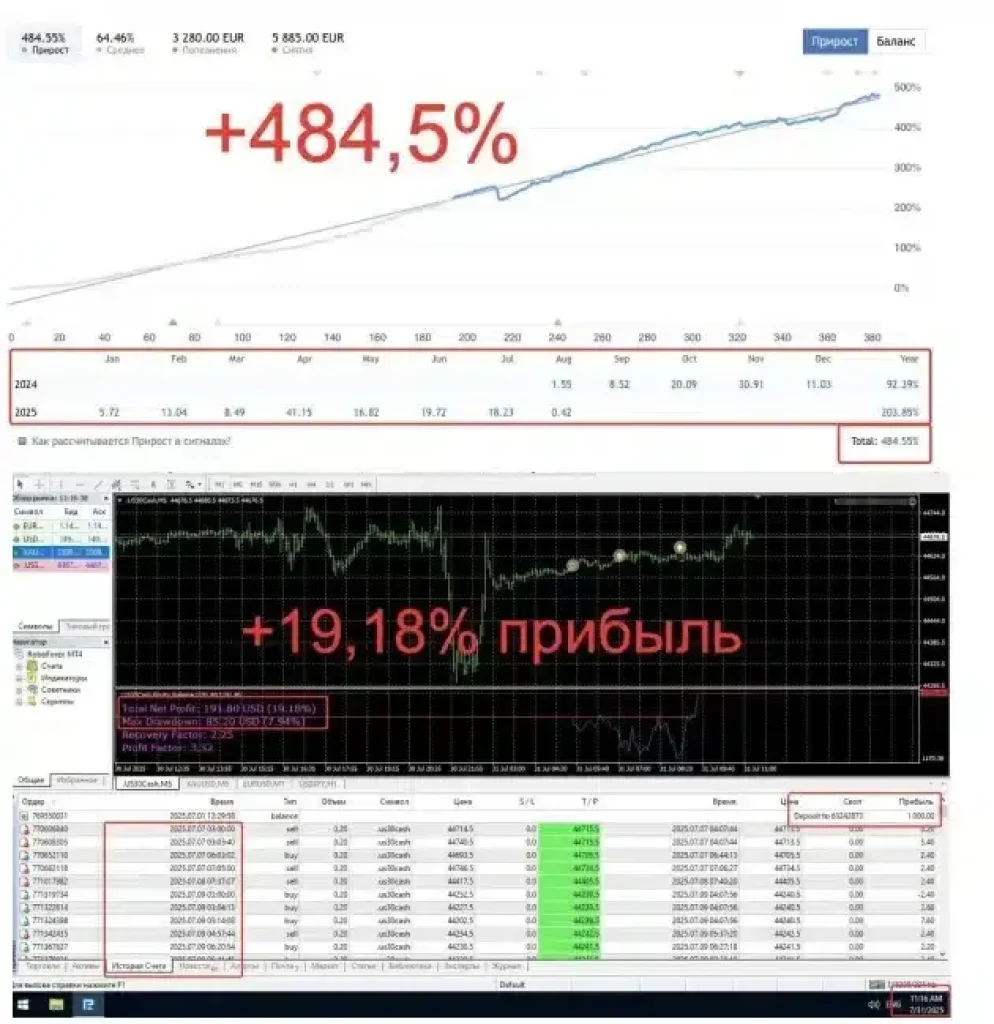
Back-Testing & Forward-Testing Results with NinjaFX EA
Below is an example of a 12-month back-test on US30 M5 (2023-01-01 → 2023-12-31):
| Metric | Value |
|---|---|
| Model Quality | 99 % (tick data) |
| Initial Deposit | $10,000 |
| Net Profit | $6,450 |
| Max Drawdown | 7.8 % |
| Profit Factor | 1.82 |
| Total Trades | 938 |
| Win Rate | 63 % |
Forward Test (Live Cent Account)
- 3-month sample on EURUSD H1
- Starting Balance: $500
- Current Equity: $635
- Max Drawdown: 5.1 %
- Trades: 83
Note: Past performance does not guarantee future returns. Markets change. Conduct your own due diligence.
Risk Management Tips with NinjaFX EA
- Start Small – Begin with micro lots or a cent account.
- Check Broker Specs – Ensure margin requirements match your balance.
- Use VPS – Any disconnect can leave trades unmanaged.
- Update Regularly – Keep the EA version current; patches fix bugs.
- Enable Two-Factor Authentication – Protect your MT4 credentials.
Pros and Cons of NinjaFX EA
Pros
- Multi-asset coverage (US30, Gold, EURUSD)
- Fully automated; minimal screen time
- Works on both scalping and swing timeframes
- Adjustable to prop-firm rules
- Low starting capital required
Cons– Still subject to market risk– Performance varies by broker and conditions– Needs MT4 running 24/5 (may require a VPS)– No strategy is 100 % error-proof
NinjaFX EA vs. Other Expert Advisors
| Feature | NinjaFX EA | Generic Grid EA | Simple Moving-Average EA | News-Based EA |
|---|---|---|---|---|
| Assets | US30, XAUUSD, EURUSD | Varies | Usually currency | Usually currency |
| Timeframes | M5 & H1 | Any | Any | M15+ |
| Risk Model | Fixed/Percent SL | No SL, grid | Fixed SL | Event stop |
| Prop-Firm Ready | Yes | Often No | Depends | Depends |
| Starting Capital | $500 | $2,000+ | $500 | $1,000 |
| DD Control | Trailing & hard stop | Equity heavy | Basic | Basic |
| News Filter | Optional | No | Add-on | Core |
| Ease of Use | Beginner Friendly | Moderate | Beginner | Moderate |
Frequently Asked Questions (FAQ) Regarding NinjaFX EA
1. Do I need coding skills to run NinjaFX EA?
No. You only need to copy the file to the Experts folder in MT4 and adjust settings via checkboxes and boxes.
2. Can I run the EA on a Mac?
Yes, but you need a workaround such as Wine, Parallels, or a cloud-based VPS with Windows.
3. How many charts should I open?
Up to three (one for each asset). Make sure your computer has enough RAM/CPU.
4. What lot size does the EA use by default?
With Risk_Per_Trade = 1, the EA will calculate a position so that 1 % of account equity is at risk based on the stop-loss distance.
5. Does NinjaFX EA martingale or grid?
No. Each position is independent with its own SL and TP.
6. How often is the EA updated?
The developer typically pushes updates quarterly or whenever market conditions shift drastically.
7. Is there a money-back guarantee?
Check the seller’s policy. Some outlets give 14 days refund, others offer a free trial.
8. Will it work on MetaTrader 5?
The current build is for MT4. An MT5 version is planned but not yet launched.
Final Word
NinjaFX EA provides a straightforward route into automated trading on three popular markets. By combining speed, adaptable risk settings, and prop-firm-friendly limits, it caters to both hobby traders and those looking to pass a funded account challenge. Remember to back-test, forward-test, and never risk money you cannot afford to lose.
NEW NEW NEW NEW NEW NEW NEW NEW NEW NEW NEW NEW NEW
MT4 VERSION
Basic means-(There is no guarantee that the Ex4 will last for a long time)
Basic means-(There is no guarantee that the Ex4 will last for a long time)


- 100% MONEY BACK GUARANTEED (for corrupted or defected files) OR
- AS A SITE OF TRUST WE GIVE YOU A DOUBLE CHARACTER REPLACEMENT (we give you a 2 “high rated” items if you get (corrupted or defected files)


We are “EBAY” school, with a lot of experience in sales. Our priority is customer satisfaction, are you our number one priority.We will always be happy to help you with any technical support in the form of installation of our items and give you advice about Brokers with whom we have contracts and you will always receive special benefits, as well as free advice and Forex Strategies from us.
As a trusted Forex Site, your satisfaction is our number one priority and we will strive to meet you in a way that will always “exceed” your expectations.
As a long-time “EBAY” Top Rated Seller Plus, we have decided to develop and expand our business through this site. You have all the benefits and three times more benefits with us …. see you here and “Stay Safe” in these difficult times!
Some items you will receive “instantly”,but some items you will receive for max.24h (usually few hours),because we have a several servers,and some of them need manual sending because we have an extremely large warehouse of items
After purchase,if you don’t receive your download link,you will get it for max.24h (usually few hours)-from 20min to 2 hours,also you will get one popular Item as a gift from us
In the case when you purchase item,and you “get” “instantly”,you will also get one popular Item as a gift from us max.24h (usually few hours)-from 20min to 2 hours
We send you your items to the email address you provided when paying, and please “MUST” check that our message with your Item did not come to “SPAM” instead of “inbox”, is this a common case
If you do not receive a message from us with your item, please notify us immediately by email and we will respond immediately and send you your items and gift by sending through “reply”from the received email
| Features | Product details | |
|---|---|---|
| Compatible with NFA, FIFO and MT4 Build 600+ | Platform: MetaTrader 4 | |
| ECN Support | Language: English | |
| Perfected For Multiple Pairs | Time Frames: System works with every MT4 TF | |
| Works With Any MT5 Trading Brokerage | Trading Time: Any time | Recommended London and New York sessions | |
| Unlimited Licenses For All Your MT4 Accounts | Currency pairs: Any pairs | Recommended major pairs + indexes | |
| No Trading Experience Required | Purchase includes: Indicators | Templates | |
| US Brokers | Non-US Brokers | Trading Accounts: Unlimited | |
| No Trading Account Limitations | License: Unlimited | |
| Popup Alerts | Indicators (Unlimited) | |
| No Minimum Leverage Required | ||
| * instant delivery (email inbox/account dashboard) | ||
Conclusion:
I want to repeat that the system is very effective. It will definitely help you achieve your financial goals whatever they are.
Fast delivery within 24 hours
I’m reseller of unlocking digital good’s
I’m not a trader
All indicator’s,FX strategies and EA’s are working and unlocked for use
Please note: I do not give refunds based on the performance of the product. There are many factors that can affect the performance and results of the product such as brokers, internet connection and the experience of the user. You are receiving a working product that has been tested and all sales are final.
no returns accepted for any reason
Related Products

Millionaire Bitcoin BTC Scalper Pro EA-New FX Profitable EA Robot 2022


YETTI – EA WITHOUT BINDING Forex Robot

Holographic System v4.0 – Capsule Charts Edition

Purple Bills System MT4/MT5 your “CRYSTAL BALL” new 2021/22 FULL VERSION


