




ArtQuant Gold EA V3.2 MT5 with set Build 5739+(BASIC)
ArtQuant Gold EA V3.2 MT5 with set-The EA combines multiple independent trading modules with centralized portfolio management, exposure limits, execution filters, virtual trade management and account-protection tools. It is designed for traders who want a dedicated XAUUSD system without having to configure individual indicators or internal strategy parameters.
Original price was: 700,00 $.14,95 $Current price is: 14,95 $.
Description:
Original website: you will easily find it on the Google
Original Price: $ 700
Content:
EXPERT EX5 UNLOCKED //GUIDE/PRESET
NEW VERSION
MT5 VERSION
This EA works on MT5 Terminal Build 5739+
Basic means-(There is no guarantee that the Ex5 will last for a long time)
Basic means-(There is no guarantee that the Ex5 will last for a long time)
About EA:
ArtQuant Gold is an automated trading system developed exclusively for Gold trading on MetaTrader 5.
The EA combines multiple independent trading modules with centralized portfolio management, exposure limits, execution filters, virtual trade management and account-protection tools. It is designed for traders who want a dedicated XAUUSD system without having to configure individual indicators or internal strategy parameters.
ArtQuant Gold supports standard XAUUSD symbols and common broker-specific Gold symbol variants, including symbols with prefixes, suffixes or alternative names.
Important: ArtQuant Gold is designed exclusively for Gold / XAUUSD or an equivalent broker Gold symbol. It will not trade when attached to an unrelated financial instrument.
The EA is independent from the chart timeframe. It can be attached to any timeframe because its internal trading logic manages the required market data independently.
Live Reference Account
The signal is provided exclusively as a transparent real-account reference. It is not a recommendation to use the same broker, deposit, leverage, lot size, risk level or trading conditions.
Differences in spread, commission, swap, execution, liquidity, leverage, symbol specifications and market conditions can produce substantially different results.
Main Features
- Developed exclusively for Gold / XAUUSD trading.
- Compatible with common broker-specific Gold symbol names.
- Structured multi-module trading engine.
- Portfolio of up to 20 independent internal modules.
- Buy, Sell or Both trading-direction modes.
- Broker setup profiles for common ECN, RAW and low-spread environments.
- Custom Portfolio mode for creating user-defined module combinations.
- Optional comma-separated module map for creating and sharing custom configurations.
- Control over the maximum number of simultaneously active modules.
- Fixed-lot or balance-step position sizing.
- Maximum total EA exposure limit.
- Maximum exposure per individual module.
- Maximum number of orders per trading cycle.
- Daily EA loss limit.
- Floating EA loss limit.
- Configurable floating drawdown protection.
- Cycle Guard for non-forced cycle closures.
- Broker margin-condition monitoring.
- Broker symbol-volume checks before sending new orders.
- Spread and execution-deviation filters.
- Optional Friday entry and closing controls.
- Optional first-Friday filter.
- Optional USD economic-calendar filter for live trading.
- Optional Christmas and New Year holiday filter.
- Virtual Take Profit, Stop Loss and Trailing Stop management.
- Magic Number continuity after terminal restarts and VPS migrations.
- On-chart information and control panel.
- Multiple selectable panel views and visual themes.
- Clean public input structure without exposing proprietary strategy parameters.
- Independent from the chart timeframe.
Multi-Module Trading Engine
ArtQuant Gold uses a portfolio of independent internal modules. Each module can detect and manage its own trading cycle, while the EA applies common rules for exposure, execution, account protection and portfolio control.
A trading module is not the same as an individual position. One active module may manage several positions as part of the same trading cycle.
For example, setting the maximum number of active modules to one means that only one module may maintain an active cycle at a time. It does not necessarily mean that only one market position can be open.
The internal strategy parameters of the modules are already configured and are not exposed in the commercial version. Users do not need to select indicators, periods, entry levels or other internal technical rules.
Portfolio Presets
ArtQuant Gold includes predefined portfolio profiles intended to simplify the initial configuration for different broker environments.
These profiles may adjust the selection of modules and other operational settings according to the intended broker conditions.
Broker profiles are configuration templates, not performance guarantees. The same profile can produce different results with different brokers, account conditions or market data.
Custom Portfolio Mode
Advanced users can select Custom Portfolio mode to create their own module combinations.
Modules can be selected in two ways:
- By enabling or disabling the individual Module 01–20 switches.
- By entering a comma-separated module map, such as 1,3,5,11,14,20.
When a valid Custom Modules Map is entered, the map determines the active portfolio and takes priority over the individual module switches.
This system allows users to create, test, optimize, save and share custom portfolio configurations without accessing the proprietary internal logic of the modules.
Maximum Active Modules
The Maximum Active Modules parameter limits how many modules may maintain open trading cycles simultaneously.
This control can be used to reduce portfolio concurrency and total account exposure. However, reducing the number of active modules does not automatically reduce risk in a perfectly proportional way.
A module with an active cycle may prevent another module from starting when the configured limit has already been reached. For this reason, the number of active modules should be evaluated together with the selected portfolio, lot size, maximum exposure and account capital.
A value of zero disables this specific limitation.
Position Sizing
Base Lot
Defines the initial trading volume used by the modules.
The appropriate lot size depends on the account balance, leverage, broker margin requirements, selected modules, simultaneous exposure and the user’s own risk tolerance.
Balance Step
Allows the base lot to increase in steps as the account balance grows.
For example, with a Base Lot of 0.01 and a Balance Step of 1000:
- From 1000 to 1999.99 balance: 0.01 base lot.
- From 2000 to 2999.99 balance: 0.02 base lot.
- From 3000 to 3999.99 balance: 0.03 base lot.
The scaling is progressive by balance steps, not continuously proportional.
A Balance Step value of zero disables balance-based lot scaling and keeps the configured base lot fixed.
Balance scaling does not guarantee that drawdown, margin usage or account risk will remain proportional. Market sequencing, simultaneous modules, cycle length, broker margin requirements and execution conditions can materially change the final exposure.
Exposure Controls
Maximum Total EA Exposure
Limits the combined open volume generated by ArtQuant Gold across all its modules.
This limit applies only to positions identified as belonging to ArtQuant Gold. It does not include manual trades or positions opened by other Expert Advisors.
A value of zero disables this limit.
Maximum Exposure Per Module
Limits the maximum combined volume that an individual module may maintain.
This can help prevent one module from consuming an excessive portion of the total permitted EA exposure.
A value of zero disables this limit.
Maximum Orders Per Cycle
Limits the number of orders that each module may open as part of one trading cycle.
This is an exposure restriction, not a guarantee that the cycle will close with a profit or that a stop-out cannot occur.
A value of zero disables this limit.
Account-Protection Tools
ArtQuant Gold includes several independent protection layers. These tools are designed to help control exposure and respond to predefined account conditions, but they cannot eliminate market, execution or broker risk.
Floating Drawdown Protection
Monitors the combined floating result of positions managed by ArtQuant Gold.
Depending on the selected mode, the EA can:
- Display an alert.
- Close its own positions and remain active.
- Close its own positions and remove itself from the chart.
The protection threshold can be defined as a percentage of the current account balance or as an amount in the account currency, depending on the selected mode.
This protection evaluates ArtQuant Gold positions only. Other trades may still affect the account equity, free margin and broker stop-out level.
Daily EA Loss Limit
Monitors the daily result generated by ArtQuant Gold, including the relevant closed result and current floating result of the EA.
When the configured threshold is reached, the EA attempts to close its managed positions and blocks new trading activity according to its protection logic.
A value of zero disables this limit.
Floating Loss Limit
Monitors the current combined floating loss generated by ArtQuant Gold.
When the threshold is reached, the EA attempts to close its managed positions and blocks new trading cycles.
A value of zero disables this limit.
Cycle Guard
Cycle Guard is designed to prevent certain non-forced cycle closures while the complete net result of the cycle remains negative after trading costs.
Cycle Guard does not prevent closures required by account protection, margin protection, manual panel commands or other forced closing conditions.
Broker Margin Protection
The EA monitors the margin-call and stop-out information reported by the broker and can attempt to react before the broker’s stop-out threshold is reached.
This feature cannot guarantee that stop-out will always be avoided. Fast market movements, gaps, delayed execution, slippage, insufficient liquidity, server interruptions or rapidly changing margin conditions may prevent positions from being closed at the expected level.
Broker Volume Checks
Before sending new orders, ArtQuant Gold checks the symbol-volume restrictions reported by the broker, including the minimum volume, maximum volume, volume step and applicable symbol limits.
Execution Controls
Maximum Entry Spread
Blocks new entries when the current spread exceeds the configured limit.
This filter applies to new trading entries. Existing cycles may continue to be managed.
Maximum Execution Slippage
Defines the maximum execution deviation permitted when the EA sends market orders.
The final execution price remains dependent on broker execution, liquidity and current market conditions.
Trade Direction
Allows the user to select:
- Buy and Sell trading.
- Buy-only trading.
- Sell-only trading.
Friday, News and Holiday Filters
ArtQuant Gold includes optional filters for preventing new cycles during selected market periods.
Friday Entry Filter
Prevents new trading cycles from starting on Fridays.
First-Friday Filter
Prevents new cycles on the first Friday of each month.
This filter can be used independently from the general Friday filter.
Friday Close Policy
Allows the EA to close its managed positions on Friday according to the selected policy and broker-server hour.
Friday closing is optional and may materialize a floating loss if the selected policy requires positions to be closed before their normal cycle completion.
USD Economic Calendar Filter
Uses the MetaTrader 5 / MQL5 Economic Calendar to detect selected USD events during live terminal operation.
The user can select:
- High-impact USD events only.
- Medium and high-impact USD events.
- The number of minutes before an event during which new cycles are blocked.
- The number of minutes after an event during which new cycles remain blocked.
The news filter does not use CSV files, Excel files, third-party websites or external historical-news databases.
Important: The economic-calendar filter is intended for live terminal operation and is ignored in the Strategy Tester and during optimization.
Holiday Break Filter
Prevents new trading cycles during the configured Christmas and New Year period.
Friday, news and holiday filters normally block the start of new cycles. They do not automatically close existing cycles unless a specific closing function or account-protection action is triggered.
Virtual Trade Management
ArtQuant Gold manages Take Profit, Stop Loss and Trailing Stop levels internally.
These protection levels are virtual and are not sent to the broker as conventional server-side SL or TP levels.
This allows the EA to manage its internal cycle logic without exposing those levels to the trading server. However, it also means that MetaTrader 5 and the EA must remain running for the correct management of open positions.
A stable VPS or continuously connected terminal is strongly recommended while ArtQuant Gold has open trades.
If the terminal, VPS, internet connection or broker server becomes unavailable, virtual protections cannot be executed until communication and EA operation are restored.
Trade Identification and Magic Numbers
ArtQuant Gold manages only positions associated with its symbol and internal Magic Numbers.
- Manual trades are not managed, modified or closed by the EA.
- Positions opened by other Expert Advisors are not managed by ArtQuant Gold.
- The Close EA Trades panel command affects only positions identified as belonging to ArtQuant Gold.
- EA exposure limits apply only to ArtQuant Gold positions.
The configured Magic Number acts as the base identifier from which the EA derives the individual Magic Numbers used by its internal modules.
Do not change the base Magic Number while the EA has active cycles. Doing so may prevent the new EA instance from correctly identifying previously opened positions.
When running multiple independent ArtQuant Gold installations or other Expert Advisors, use separate Magic Numbers.
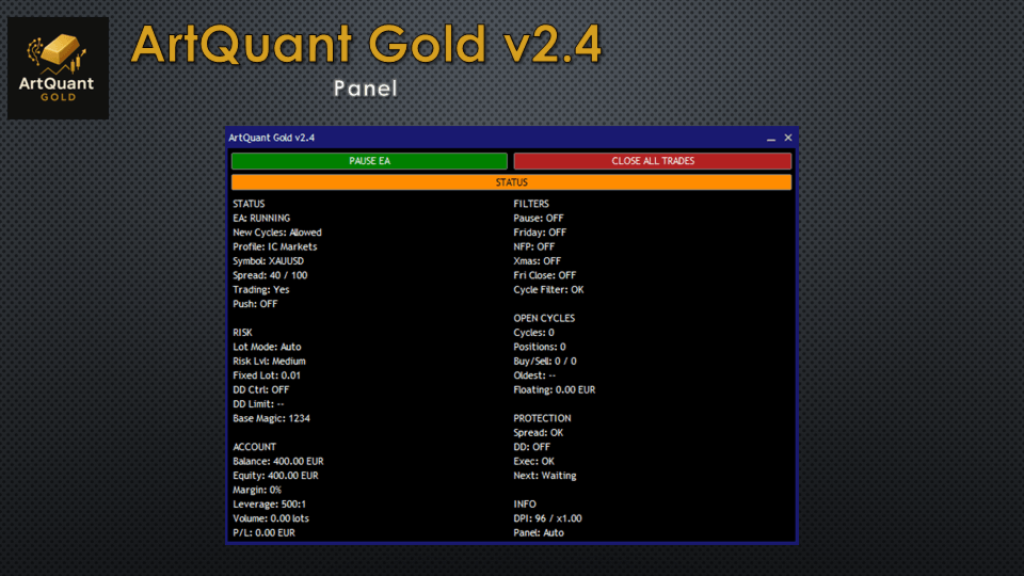
Control Panel
The optional chart panel provides operational information about the EA, including:
- Current EA status.
- Risk and protection status.
- Active module information.
- Current market and spread information.
- Entry-filter status.
- Current EA exposure.
- Manual pause control.
- Manual closing control for EA positions.
Hiding the panel is a visual change only and does not disable the trading logic.
Start Paused
Starts the EA with new trading cycles disabled.
If the EA identifies an existing cycle belonging to the same installation, the cycle can continue to be managed while the opening of new cycles remains paused.
Manual Pause
The panel pause control blocks new cycles. It does not abandon positions or stop the management of cycles that are already open.
Close EA Trades
Closes only positions identified as belonging to ArtQuant Gold.
This is a forced manual closing action and may close positions at a loss.
Push Notifications
ArtQuant Gold can send mobile push notifications for selected cycle-closing events.
Push notifications must first be correctly configured in the MetaTrader 5 terminal settings.
Requirements
- Platform: MetaTrader 5.
- Account type: Hedging account.
- Trading symbol: Gold / XAUUSD or a compatible broker Gold symbol.
- Broker conditions: ECN, RAW or consistently low-spread conditions are preferable.
- Execution: Stable order execution and sufficient Gold liquidity.
- Connectivity: Continuous terminal operation is required while virtual protections are managing open trades.
- VPS: A stable 24/7 VPS is recommended for live operation.
A reference initial deposit of 1000 USD and leverage of up to 1:500 may provide greater operational flexibility, but these figures are not guarantees of suitability or account survival.
The required capital depends on the lot size, balance scaling, number of enabled modules, simultaneous-module limit, maximum cycle exposure, broker margin requirements and accepted risk.
Recommended Initial Setup
- Attach ArtQuant Gold to the broker’s Gold / XAUUSD chart.
- Confirm that the account uses the hedging position system.
- Select the portfolio profile closest to the broker environment.
- Choose a conservative Base Lot.
- Review the maximum total exposure and per-module exposure.
- Configure the preferred account-protection limits.
- Use a unique Magic Number.
- Test the configuration in the Strategy Tester.
- Run the EA on a demo account before using significant live capital.
- Use a stable VPS during live operation.
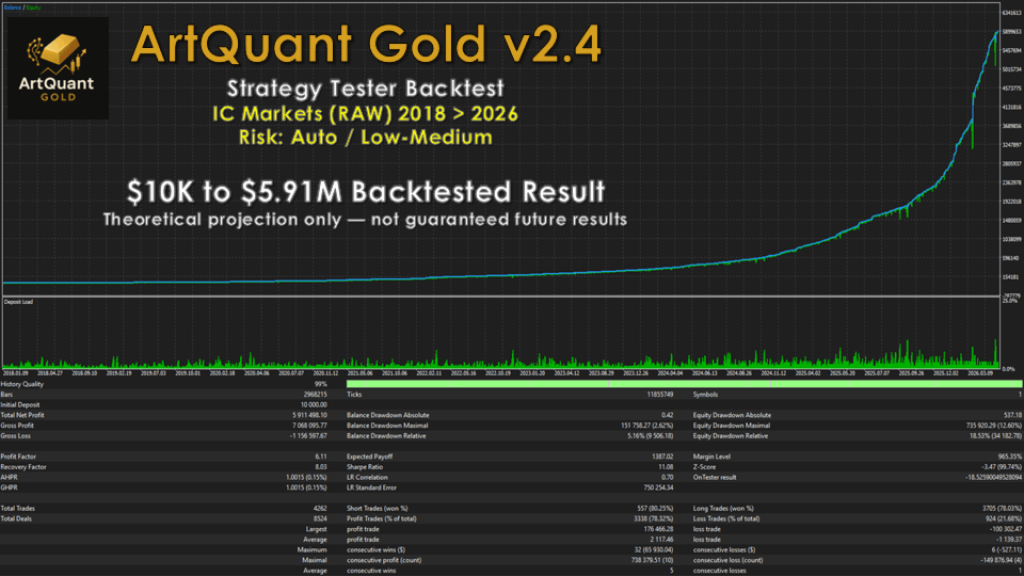
Backtesting
For the most representative historical tests available in MetaTrader 5, use the Every tick based on real ticks model whenever sufficient broker data is available.
Tests should cover different market conditions and sufficiently long periods. A short profitable test is not enough to evaluate the behaviour of a grid-based system.
Review more than the final net profit. Relevant statistics include:
- Maximum balance drawdown.
- Maximum equity drawdown.
- Maximum simultaneous exposure.
- Margin level.
- Number of trades.
- Length of losing and recovery periods.
- Performance by year or market regime.
- Dependence on isolated large trades.
- Stability under different spreads and execution conditions.
Backtest results may vary between brokers because of differences in:
- Historical prices and ticks.
- Spread.
- Commission.
- Swap.
- Contract size.
- Tick value.
- Minimum lot and volume step.
- Margin requirements.
- Trading sessions.
- Execution model.
The USD Economic Calendar filter is ignored during backtesting and optimization. Historical tests therefore do not reproduce the live news-filter behaviour.
Optimization and Custom Set Creation
ArtQuant Gold allows advanced users to optimize the parameters exposed in the commercial interface and create their own SET files.
The recommended approach is to optimize in separate stages instead of changing every parameter simultaneously.
1. Establish a Reference Test
Run the selected broker profile using fixed and conservative risk settings. Save the results as a reference before making changes.
2. Optimize the Portfolio
Select Custom Portfolio mode and test different module combinations while keeping lot size and protection settings stable.
The goal should not be to find only the highest historical profit. Prefer combinations that show reasonable consistency, manageable drawdown and sufficient trading activity across different periods.
3. Evaluate Module Concurrency
Test different Maximum Active Modules values and compare their effect on exposure, margin usage, drawdown and portfolio behaviour.
4. Evaluate Position Sizing Separately
After selecting a portfolio, test fixed-lot and balance-step configurations independently.
A more aggressive lot-scaling configuration may make a backtest appear substantially more profitable while also increasing the probability and severity of future drawdown.
5. Configure Exposure Limits
Review the Maximum Total EA Exposure, Maximum Exposure Per Module and Maximum Orders Per Cycle according to the intended account capital and broker margin conditions.
6. Validate Outside the Optimization Period
Use a forward or out-of-sample period that was not used to select the configuration.
A set that performs well only during its optimization period may be overfitted to that historical data.
7. Save and Document the SET File
Before saving a custom SET file, verify the complete input configuration, including:
- EA version.
- Broker and symbol.
- Portfolio or module map.
- Base lot and balance step.
- Exposure limits.
- Protection settings.
- Test deposit and leverage.
- Optimization and validation periods.
A custom configuration is not automatically safer or better than the included profiles. Every custom SET file must be validated by the user under the intended broker and account conditions.
Important Information About Grid Trading
ArtQuant Gold uses a grid-based multi-position trading structure.
Grid systems may maintain several positions during the same cycle and can experience significant or prolonged floating drawdown.
They are particularly sensitive to:
- Lot size.
- Account capital.
- Leverage.
- Margin requirements.
- Maximum number of positions.
- Simultaneously active modules.
- Strong directional movements.
- Market gaps.
- Spread expansion.
- Swap and holding costs.
- Execution delays.
Reducing the base lot or the number of active modules may reduce exposure, but it does not eliminate the possibility of substantial loss or complete account loss.
Risk Warning
Trading leveraged financial instruments involves a high level of risk.
ArtQuant Gold does not guarantee profits, a specific drawdown, account survival or protection against stop-out.
Historical tests, optimization results, demonstrations and live signals describe past behaviour under specific conditions. They do not guarantee future results.
Protection functions depend on terminal operation, connectivity, broker execution, available liquidity and market conditions. No software-based protection can guarantee execution at an exact price or prevent every possible loss.
Use only capital that you can afford to lose. Test the EA thoroughly and ensure that you understand its grid-based trading structure before using it on a live account.
Support
Support is available through the product Comments section and private messages on MQL5.com.
When requesting technical support, include the following information whenever relevant:
- Broker name.
- Account type.
- Gold symbol name.
- Account leverage.
- EA version.
- EA SET file or screenshots of the inputs.
- Screenshot of the control panel.
- Experts log.
- Journal log.
- Strategy Tester report or screenshot.
Do not publish account passwords, investor passwords, personal data or other private access information.
Distribution Notice
ArtQuant Gold is officially distributed exclusively through MQL5.com.
Copies, downloads, resales, rental offers or distributions outside the official MQL5 Market are not authorized and may contain modified, outdated or unsafe files.


- 100% MONEY BACK GUARANTEED (for corrupted or defected files) OR
- AS A SITE OF TRUST WE GIVE YOU A DOUBLE CHARACTER REPLACEMENT (we give you a 2 “high rated” items if you get (corrupted or defected files)


We are “EBAY” school, with a lot of experience in sales. Our priority is customer satisfaction, are you our number one priority.We will always be happy to help you with any technical support in the form of installation of our items and give you advice about Brokers with whom we have contracts and you will always receive special benefits, as well as free advice and Forex Strategies from us.
As a trusted Forex Site, your satisfaction is our number one priority and we will strive to meet you in a way that will always “exceed” your expectations.
As a long-time “EBAY” Top Rated Seller Plus, we have decided to develop and expand our business through this site. You have all the benefits and three times more benefits with us …. see you here and “Stay Safe” in these difficult times!
Some items you will receive “instantly”,but some items you will receive for max.24h (usually few hours),because we have a several servers,and some of them need manual sending because we have an extremely large warehouse of items
After purchase,if you don’t receive your download link,you will get it for max.24h (usually few hours)-from 20min to 2 hours,also you will get one popular Item as a gift from us
In the case when you purchase item,and you “get” “instantly”,you will also get one popular Item as a gift from us max.24h (usually few hours)-from 20min to 2 hours
We send you your items to the email address you provided when paying, and please “MUST” check that our message with your Item did not come to “SPAM” instead of “inbox”, is this a common case
If you do not receive a message from us with your item, please notify us immediately by email and we will respond immediately and send you your items and gift by sending through “reply”from the received email
| FEATURES | PRODUCT DETAILS | |
|---|---|---|
| Compatible with NFA, FIFO and MT5 | Platform: MetaTrader 5 | |
| ECN Support | Language: English | |
| Perfected For Multiple Pairs | Time Frames: System works with every MT5 TF | |
| Works With Any MT5 Trading Brokerage | Trading Time: Any time | Recommended London and New York sessions | |
| Unlimited Licenses For All Your MT5 Accounts | Currency pairs: Any pairs | Recommended major pairs + indexes | |
| No Trading Experience Required | Purchase includes: Indicators | Templates | |
| US Brokers | Non-US Brokers | Trading Accounts: Unlimited | |
| No Trading Account Limitations | License: Unlimited | |
| Popup Alerts | Indicators (Unlimited) | |
| No Minimum Leverage Required | ||
| * instant delivery (email inbox/account dashboard) | ||
| Features | Product details | |
|---|---|---|
| Compatible with NFA, FIFO and MT5 Build 600+ | Platform: MetaTrader 5 | |
| ECN Support | Language: English | |
| Perfected For Multiple Pairs | Time Frames: System works with every MT5 TF | |
| Works With Any MT5 Trading Brokerage | Trading Time: Any time | Recommended London and New York sessions | |
| Unlimited Licenses For All Your MT5 Accounts | Currency pairs: Any pairs | Recommended major pairs + indexes | |
| No Trading Experience Required | Purchase includes: Indicators | Templates | |
| US Brokers | Non-US Brokers | Trading Accounts: Unlimited | |
| No Trading Account Limitations | License: Unlimited | |
| Popup Alerts | Indicators (Unlimited) | |
| No Minimum Leverage Required | ||
| * Due to reviews of themegareview.co.uk | ||
Delivery: Instant delivery (email inbox/account dashboard)
Conclusion:
I want to repeat that the system is very effective. It will definitely help you achieve your financial goals whatever they are.
Package include: System Indicators and template in a zip folder
Fast delivery within 24 hours
I’m reseller of unlocking digital good’s
I’m not a trader
All indicator’s,FX strategies and EA’s are working and unlocked for use
Please note: I do not give refunds based on the performance of the product. There are many factors that can affect the performance and results of the product such as brokers, internet connection and the experience of the user. You are receiving a working product that has been tested and all sales are final.
no returns accepted for any reason
User Reviews
Be the first to review “ArtQuant Gold EA V3.2 MT5 with set Build 5739+(BASIC)”
You must be logged in to post a review.
Related Products


Money Pile EA MT4 unlimited (ORIGINAL)Build 1425+
FXSTABILIZER PRO EA-perfect stable FX Robot


Forex Tramp EA 4.0 Robot


There are no reviews yet.