
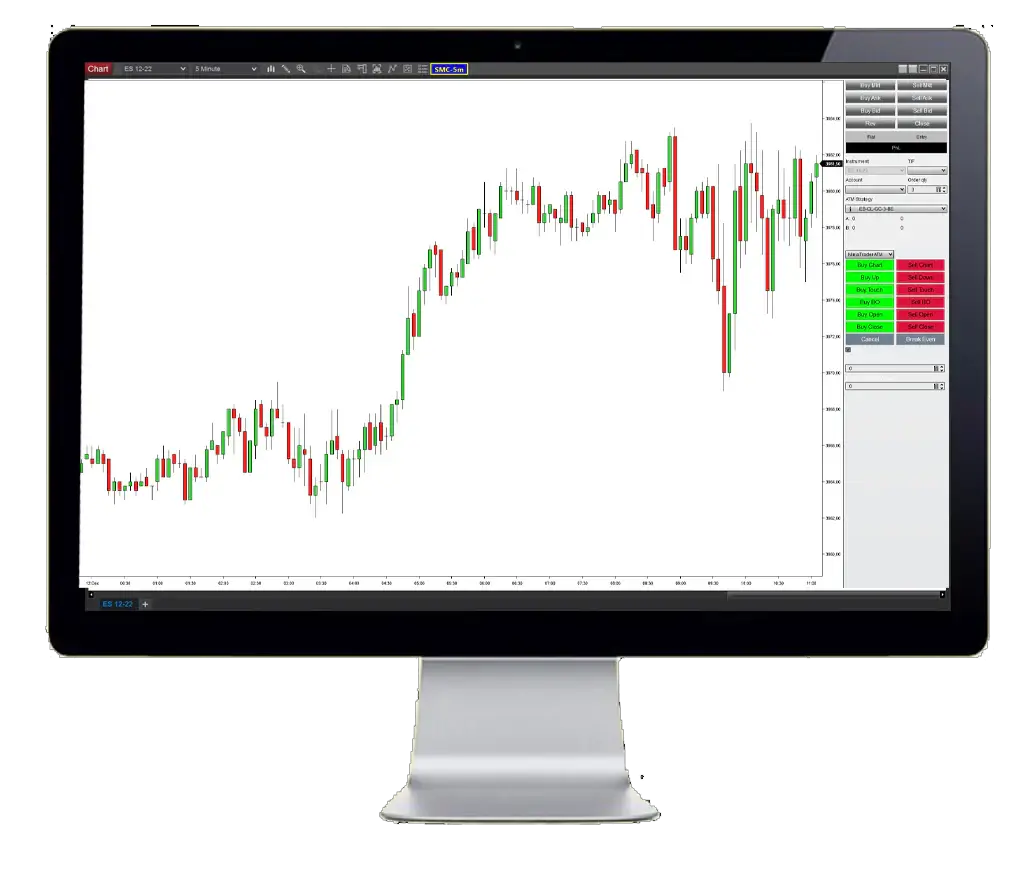



Advanced Trade Panel NT8
Advanced Trade Panel NT8-is a trading tool for all traders. It allows you to set up your order in a fast and easy way with the click of the button or hotkeys. No matter if you are trading breakouts, support/resistance, Fibonacci, or any other strategy. This tool will track your entry price and enter at the exact correct time.
Original price was: 399,00 $.39,95 $Current price is: 39,95 $.
Full Item description:
Description:
Content:Full package
Original Website: https://tradedevils-indicators.com/collections/frontpage/products/advanced-trade-panel
Original Price: $ 399
- 100% MONEY BACK GUARANTEED (for corrupted or defected files) OR
- AS A SITE OF TRUST WE GIVE YOU A DOUBLE CHARACTER REPLACEMENT (we give you a 2 “high rated” items if you get (corrupted or defected files)


We are “EBAY” school, with a lot of experience in sales. Our priority is customer satisfaction, are you our number one priority.We will always be happy to help you with any technical support in the form of installation of our items and give you advice about Brokers with whom we have contracts and you will always receive special benefits, as well as free advice and Forex Strategies from us.
As a trusted Forex Site, your satisfaction is our number one priority and we will strive to meet you in a way that will always “exceed” your expectations.
As a long-time “EBAY” Top Rated Seller Plus, we have decided to develop and expand our business through this site. You have all the benefits and three times more benefits with us …. see you here and “Stay Safe” in these difficult times!
Some items you will receive “instantly”,but some items you will receive for max.24h (usually few hours),because we have a several servers,and some of them need manual sending because we have an extremely large warehouse of items
After purchase,if you don’t receive your download link,you will get it for max.24h (usually few hours)-from 20min to 2 hours,also you will get one popular Item as a gift from us
In the case when you purchase item,and you “get” “instantly”,you will also get one popular Item as a gift from us max.24h (usually few hours)-from 20min to 2 hours
We send you your items to the email address you provided when paying, and please “MUST” check that our message with your Item did not come to “SPAM” instead of “inbox”, is this a common case
If you do not receive a message from us with your item, please notify us immediately by email and we will respond immediately and send you your items and gift by sending through “reply”from the received email
| FEATURES | PRODUCT DETAILS | |
|---|---|---|
| Compatible with NFA, FIFO and NT8 | Platform: NT8 | |
| ECN Support | Language: English | |
| Perfected For Multiple Pairs | Time Frames: System works with every NT8 TF | |
| Works With Any NT8 Trading Brokerage | Trading Time: Any time | Recommended London and New York sessions | |
| Unlimited Licenses For All Your NT8 Accounts | Currency pairs: Any pairs | Recommended major pairs + indexes | |
| No Trading Experience Required | Purchase includes: Indicators | Templates | |
| US Brokers | Non-US Brokers | Trading Accounts: Unlimited | |
| No Trading Account Limitations | License: Unlimited | |
| Popup Alerts | Indicators (Unlimited) | |
| No Minimum Leverage Required | ||
| * instant delivery (email inbox/account dashboard) | ||
| Features | Product details | |
|---|---|---|
| Compatible with NFA, FIFO and NT8 | Platform: NT8 | |
| ECN Support | Language: English | |
| Perfected For Multiple Pairs | Time Frames: System works with every NT8 TF | |
| Works With Any NT8 Trading Brokerage | Trading Time: Any time | Recommended London and New York sessions | |
| Unlimited Licenses For All Your NT8 Accounts | Currency pairs: Any pairs | Recommended major pairs + indexes | |
| No Trading Experience Required | Purchase includes: Indicators | Templates | |
| US Brokers | Non-US Brokers | Trading Accounts: Unlimited | |
| No Trading Account Limitations | License: Unlimited | |
| Popup Alerts | Indicators (Unlimited) | |
| No Minimum Leverage Required | ||
| * Due to reviews of themegareview.co.uk | ||
Delivery: Instant delivery (email inbox/account dashboard)
Conclusion:
I want to repeat that the system is very effective. It will definitely help you achieve your financial goals whatever they are.
Package include: System Indicators and template in a zip folder
Fast delivery within 24 hours
I’m reseller of unlocking digital good’s
I’m not a trader
All indicator’s,FX strategies and EA’s are working and unlocked for use
Please note: I do not give refunds based on the performance of the product. There are many factors that can affect the performance and results of the product such as brokers, internet connection and the experience of the user. You are receiving a working product that has been tested and all sales are final.
no returns accepted for any reason
Related Products

MQ Momentum Trender Pro 2 for NT8 & TOS
KISS Order Flow V.2113 NinjaTrader 8
Forex DJ MARKET X20 (Indicators + EA)

Bank’s Secret Indicator “Smart Money” V3.5-95% win Build 1431+

Algos Trading Indicator Bundle NT8



Overview:
The advanced trade panel is a trading tool for all traders. It allows you to set up your order in a fast and easy way with the click of the button or hotkeys. No matter if you are trading breakouts, support/resistance, Fibonacci, or any other strategy. This tool will track your entry price and enter at the exact correct time.
For breakout traders, this trade panel can automatically open a trade when price breakouts of a range or triangle.
If you are a price action, range, or trend trader then it can automatically open a trade when the price bounces of a support/resistance line or simply buy/sell when the previous bar hi/lo gets broken.
and for Fibonacci traders, this trade panel can automatically enter a new order when the price hits a 50% retracement
The Advanced trade panel allows you to place an order quickly using the buy/sell chart buttons and/or by using hotkeys. You can assign a Hotkey (F1-F12) to place a buy or sell order at the current mouse position. Just press the hotkey and the order is placed at the price of the current mouse position
Another option is to use the buy/sell chart buttons. By pressing one of these buttons a buy/sell line will appear as shown in the screenshot above. Next, you move your mouse to the correct price. The buy/sell line will follow your mouse so no need to select and drag it. When your mouse is at the price you want to place your order then simply click the mouse button (or by pressing ENTER) to place your order.
If you don’t want to place an order then simply right click your mouse button (or press DEL) to cancel your order
2.1. Step #1: Choose your position sizing or use NinjaTraders ATM
You can choose to use NinjaTrader’s built-in ATM for your orders, or use the ATM of the Trade Panel. The trade panel allows you to specify your risk using
2.2 Step #2: Press buy/sell chart
After selecting your desired risk you just press the Buy/Sell chart. Next, you can move your cursor to the place where you would like to open a trade and place your order with a single mouse click. After you placed your order, you move your mouse to the stop-loss price and then mouse click again to place your stop loss. Finally you move your mouse to the target price and again click your mouse to place your t
2.3 Step #3: Place your entry
First, place your entry by moving your mouse over the chart to the correct price you want to enter the market. Then you confirm your entry with a single mouse click
2.4 Step #4: Place your stop loss
Next, you place your stop loss by moving your mouse to the place where you would like to place your stop. Note that the indicator will automatically calculate the number of contracts you can trade based on your stop-loss and the risk/trade you selected. It will also not allow you to place your stop wider than the risk/trade you set allows. This way you are sure you never risk more than you want
Both the number of contracts and the stop-loss in $ are on the stop-loss line.
2.5 Step #5: Place your target
Finally, you can place your target by moving your move to the correct price and confirming it with a mouse click. Note that the target line shows you both the risk/reward ratio and also the profit in the amount of $
4. Auto Buy/Sell when previous bar hi/lo gets broken
Does your strategy require you to enter the market when the previous bar hi/lo gets broken? Then the trade panel is just for you. Simply click the Buy up or Sell down button once your trade is setting up. From there on this trade panel will keep tracking your entry bar by bar and will automatically open the trade when the previous bar hi/lo gets broken.
5. Auto trade ranges, trend channels/lines, and S&R lines
Do you want to open a trade when the price bounces of a support/resistance line? Then this trade panel will make your life easier. Simply drawing your support/resistance lines and press Buy up or Sell Down. The panel will then start monitoring price and opens a new trade for you the moment it touches your support resistance/ line. we have full support for not only horizontal but also sloping support/resistance lines like trendlines and trend channels
6. Auto trade breakouts from wedges, triangles, ranges
Are you a break-out trader? Then you know it can take a long time before the price will break out a range of triangle. Do you want to sit in front of the screen just waiting and waiting for the breakout to happen? Our trade panel allows you to define your range by drawing a rectangle or triangle and when done. We’ll take it from there
Our trade panel will carefully watch the price action and open a trade the moment it breakout your rectangle or triangle. No more endless waiting in front of the screen or missing trades. It can even use an OCO to cancel out all opposing orders
7. Specify Offset in ticks for each trade
One small but very handy feature we build into our trade panel is the option to specify an offset (in ticks). For example..as a breakout trader, you might want to open a trade when price breakout of a range/triangle by 4 ticks. Or as a support/resistance trader you might want to front-run your order by 2 ticks. Our trade panel makes this very easy. Just enter the # of ticks you would like to use and let our trade panel worry about the rest.
8. OCO orders(One cancels others)
The advanced trade panel allows you to enable the OCO. When enabled any outstanding short orders will be canceled when a long order gets filled (and vice versa). This can be very useful for breakout traders since they can place both short and long orders and when the price breaks out and one of the short/long orders gets filled then the other one will be canceled automatically.
9. Cancel / Break-even buttons
Two simple buttons. The cancel button is used to quickly cancel any outstanding orders. And the break-even button allows you to move your stops to breakeven with a single button click
10. Key features:
Key Features
The advanced trade panel is a trading tool for all traders. It allows you to set up your order in a fast and easy way with the click of the button or hotkeys. No matter if you are trading breakouts, support/resistance, Fibonacci, or any other strategy. This tool will track your entry price and enter at the exact correct time.
For breakout traders, this trade panel can automatically open a trade when price breakouts of a range or triangle. If you are a price action, range, or trend trader then it can automatically open a trade when the price bounces of a support/resistance line or simply buy/sell when the previous bar hi/lo gets broken.
For Fibonacci traders, this trade panel can automatically enter a new order when the price hits a 50% retracement
Advanced Trade Panel
Like they say. practice makes perfect and the bar replay indicator is perfect for practicing. When compared with NinjaTrader market replay it’s so much faster and easier to use that practicing becomes fun to do. You will improve your entries and exits, and gain more screentime and experience with every practice session you do.
Features and Settings
Quick Order using hotkey’s or single mouse click
The Advanced trade panel allows you to place an order quickly using the buy/sell chart buttons and/or by using hotkeys. You can assign a Hotkey (F1-F12) to place a buy or sell order at the current mouse position. Just press the hotkey and the order is placed at the price of the current mouse position.
Another option is to use the buy/sell chart buttons. By pressing one of these buttons a buy/sell line will appear as shown in the screenshot above. Next, you move your mouse to the correct price. The buy/sell line will follow your mouse so no need to select and drag it. When your mouse is at the price you want to place your order then simply click the mouse button (or by pressing ENTER) to place your order.
If you don’t want to place an order then simply right click your mouse button (or press DEL) to cancel your order
Step #1: Choose your position sizing or use NinjaTraders ATM
You can choose to use NinjaTrader’s built-in ATM for your orders, or use the ATM of the Trade Panel. The trade panel allows you to specify your risk using:
– Use Ninjatrader’s internal ATM
– Use a fixed # of contracts
– Risk amount ($) / trade
– Risk % of your trading capital / trade
Step #2: Press buy/sell chart
After selecting your desired risk you just press the Buy/Sell chart. Next, you can move your cursor to the place where you would like to open a trade and place your order with a single mouse click. After you placed your order, you move your mouse to the stop-loss price and then mouse click again to place your stop loss. Finally you move your mouse to the target price and again click your mouse to place your trade.
Step #3: Place your entry
First, place your entry by moving your mouse over the chart to the correct price you want to enter the market. Then you confirm your entry with a single mouse click
Step #4: Place your stop loss
Next, you place your stop loss by moving your mouse to the place where you would like to place your stop. Note that the indicator will automatically calculate the number of contracts you can trade based on your stop-loss and the risk/trade you selected. It will also not allow you to place your stop wider than the risk/trade you set allows. This way you are sure you never risk more than you want.
Both the number of contracts and the stop-loss in $ are on the stop-loss line.
Step #5: Place your target
Finally, you can place your target by moving your move to the correct price and confirming it with a mouse click. Note that the target line shows you both the risk/reward ratio and also the profit in the amount of $
Auto Buy/Sell when previous bar hi/lo gets broken
Does your strategy require you to enter the market when the previous bar hi/lo gets broken? Then the trade panel is just for you. Simply click the Buy up or Sell down button once your trade is setting up. From there on this trade panel will keep tracking your entry bar by bar and will automatically open the trade when the previous bar hi/lo gets broken.
Auto trade ranges, trend channels/lines, and S&R lines
Do you want to open a trade when the price bounces of a support/resistance line? Then this trade panel will make your life easier. Simply drawing your support/resistance lines and press Buy up or Sell Down. The panel will then start monitoring price and opens a new trade for you the moment it touches your support resistance/ line. we have full support for not only horizontal but also sloping support/resistance lines like trendlines and trend channels
Auto trade breakouts from wedges, triangles, ranges
Are you a break-out trader? Then you know it can take a long time before the price will break out a range of triangle. Do you want to sit in front of the screen just waiting and waiting for the breakout to happen? Our trade panel allows you to define your range by drawing a rectangle or triangle and when done. We’ll take it from there.
Our trade panel will carefully watch the price action and open a trade the moment it breakout your rectangle or triangle. No more endless waiting in front of the screen or missing trades. It can even use an OCO to cancel out all opposing orders.
Specify Offset in ticks for each trade
One small but very handy feature we build into our trade panel is the option to specify an offset (in ticks). For example..as a breakout trader, you might want to open a trade when price breakout of a range/triangle by 4 ticks. Or as a support/resistance trader you might want to front-run your order by 2 ticks. Our trade panel makes this very easy. Just enter the # of ticks you would like to use and let our trade panel worry about the rest.
OCO orders(One cancels others)
The advanced trade panel allows you to enable the OCO. When enabled any outstanding short orders will be canceled when a long order gets filled (and vice versa). This can be very useful for breakout traders since they can place both short and long orders and when the price breaks out and one of the short/long orders gets filled then the other one will be canceled automatically.
Cancel / Break-even buttons
Two simple buttons. The cancel button is used to quickly cancel any outstanding orders. And the break-even button allows you to move your stops to breakeven with a single button click
Feature list